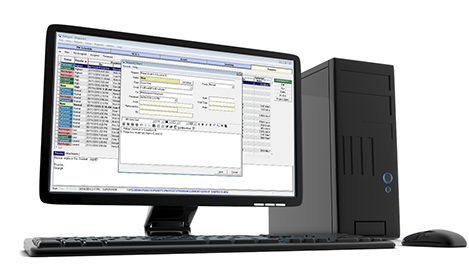

In preventative maintenance, the details matter. Below are the details of PMXpert’s powerful features that will make your job run smoothly, more efficiently and more cost-effectively. Simply select a feature to learn more.

Import information, including but not limited to, costing and meter readings from external sources.

Complete management of your assets including all details on your PM services, historical information and asset details.

Record all details of your assets. Easily retrieve work orders, services, parts, fluids, labor, downtime, meter readings, location history and warranty information.
Track when assets are not in use, whether planned or unplanned.

Set up the database specific to your terminology (service type and cycle definition, asset, inventory, etc.) and create custom fields to meet your needs.

A complete and filterable history of all expenses (parts, fluids, labor, etc.) incurred on assets.

Ability to update all asset meters quickly and easily.

Keep track of current, available and needed stock numbers on all tracked parts and fluids. Generate PO's based on available, min/max or back ordered stocks.

Color coding allows easy identification of the service status. View calendar by week, month or year, and show assets by category, location, department or responsibility.

Enter the warranty period of an asset or part, and the system will notify you if work is being done during the warranty period.

Receive emails based on milestones like overdue work orders, unscheduled PM services and low inventory.

Track labor (internal and external) hours and costs for all work orders and services.
"I find as a supervisor that PMXpert is a great tool - an all in one package. I can see pictures of my equipment, trace where my equipment was/is, and the cost of repairs. Sites are sharing info with us about maintenance and they can see the available gear we have ready to go. My suppliers info is in there, work orders and so much more - just a great tool overall. The greatest part is I'm not a computer guy and I can work PMXpert."
- Alan Dicaire,
Dumas Contracting Ltd.

Ability to email service requests that are then automatically pulled into PMXpert for completion.
Submit and check status of service requests or work orders through an online portal.

Receive in-application notifications on overdue work order services and overdue unscheduled PM services.

Get fast, accurate detailed information with professionally designed reports that can be customized for all your reporting needs.

Tracking of all PM and emergency repair services with all parts, labor, fluids, and procedures.
See upcoming PM services and generate WO's grouped by asset, service, responsible person, and location, as required.

Generate PO's based on low inventory and/or non-inventory parts with the ability to set uer authorization limits.

Provide different levels of access to the system on a per-user basis.

Attach external documents to assets, like manuals, images, service reports or safety reports.

Create batches of inventory items with set expiration dates. When a batch expires, the items become expired stock, which can then be exposed of.

Wizards make the system user-friendly, while saving time and ensuring that all necessary information is captured.

Set up a shell of an asset that includes all its basic details, PM services, parts lists, and more to make addition of new assets quick and easy.